Basics
What Is JSX?
JSX looks similar to HTML in syntax, but it’s actually a syntax extension of JavaScript. Its feature is the fusion of UI and JavaScript logic - creating components. Although JSX is not mandatory in React development, it’s widely used by most developers because it improves the development experience and allows React to display error and warning messages.
What is JSX?
JSX essentially generates React elements, and it’s a syntactic sugar of
React.createElement(component, props, ...children);The following example:
<MyButton color="blue" shadowSize={2}>
  Click Me
</MyButton>
is equivalent to:
React.createElement(MyButton, { color: "blue", shadowSize: 2 }, "Click Me");Why use JSX?
As previously mentioned, JSX is JavaScript, and using it means combining markup and logic. This appears to violate the principle of separation of concerns, where content presentation and logic should be separated. However, many modern websites are highly dynamic, and logic can affect content presentation. Combining content and logic using JSX ensures that both stay in sync when changes are made, and makes it easier when reusing code. Additionally, content that’s not related to a component can be placed in another component, which allows changes in one component to be independent of another.
JSX Rules
- Return a single root element: If a component returns multiple elements, the elements must be wrapped in a parent element (for example, using
<div>or a Fragment (<> and </>))。 - All tags must be closed: JSX requires that all tags have an end tag, even for self-closing tags like
<img>which should be written as<img/>. - Almost all attribute names are in camelCase: JSX is eventually converted to JavaScript, and JavaScript has restrictions on variable names such as not using reserved words or hyphens. Therefore, many attribute names in JSX are written in camelCase. For example, if you want to add a CSS class, use
className,stroke-widthshould be written asstrokeWidth.However, there are exceptions foraria-*anddata-*attributes, which should be written the same way as in HTML.
What is Virtual DOM?
What is Virtual DOM?
Virtual DOM is a programming concept that is used not only in React but also in other frameworks such as Vue. However, this article will focus on React’s Virtual DOM. Virtual DOM is stored in memory as a JavaScript object, simulating the real DOM.
Is Virtual DOM faster than directly manipulating the DOM?
Many people believe that the advantage of using Virtual DOM is that it is more efficient and faster than directly manipulating the DOM. However, this idea is not entirely correct. React official has never claimed that Virtual DOM is faster than directly manipulating the DOM. On the contrary, using Virtual DOM is usually slower than native DOM operations because of the extra layer of operation.
So, why use Virtual DOM?
Advantages of React Virtual DOM
According to the React official documentation, the advantage of using Virtual DOM is that: this approach enables the declarative API of React. In other words, this means that we do not need to directly manipulate the DOM, but rather through a declarative syntax. The declarative writing style allows developers to tell React what UI we want through state, without having to directly manipulate the DOM. React ensures that the DOM and the state match.
Declarative writing style can avoid the following two problems with direct DOM manipulation:
- When the DOM Tree structure becomes larger, it becomes difficult to manage. For example, there is now a large form component, and when changing a value, it may be necessary to traverse all the form component nodes and operate the DOM to change the value, which can easily result in unnoticed bugs during this process.
- Low efficiency. Although DOM operations may be fast, during rendering and reflow stages, frequent direct DOM operations are often the main cause of frame stuttering, so the more you directly manipulate the DOM, the more likely you are to hit performance bottlenecks.
By using Virtual DOM, developers can focus only on the UI without worrying about how to implement it. During the rendering process, React will automatically compare the Virtual DOM and the real DOM, making only the necessary changes to the real DOM.
Explain the Lifecycle of a React Component
Understanding the React Lifecycle is not only one of the most basic concepts of learning React, but it is also a classic interview question. This article will introduce the three major lifecycle phases and the commonly used lifecycle methods in Class Component.
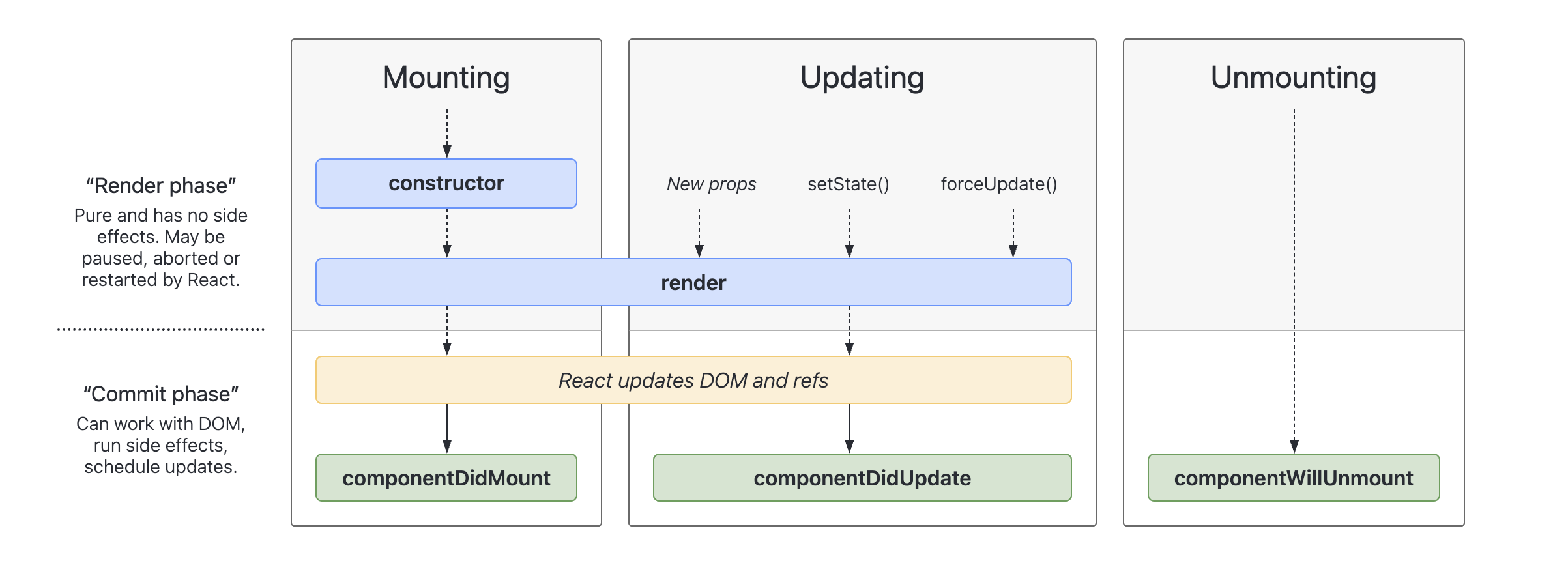
React component lifecycle is divided into three stages: mounting, updating and unmounting. If you are using a class component, we can use the methods provided by React to execute code during the lifecycle of the component. The following are some common methods to operate the component’s lifecycle. (Note that these methods are lifecycle methods for class components. If you use functional components, the concept is different.)
Lifecycle: Mounting, Updating, and Unmounting
Mounting
When React first renders the component and adds the rendered node to the DOM, we call it mounting. After React adds the node to the DOM, the browser renders and draws the page. At this stage, the lifecycle will call these methods in the following order:
Updating
After mounting, if a component’s props or state changes, it will trigger a re-render. After the re-render, React will compare which parts of the virtual DOM have changed and then update the changed parts to the actual DOM. We call this stage updating. When a component is re-rendered, its lifecycle will call these methods in the following order:
static getDerivedStateFromProps()shouldComponentUpdate()render()getSnapshotBeforeUpdate()componentDidUpdate()
Unmounting
When a component is removed from the DOM, we call it unmounting. At this time, the following method will be called:
Render and Commit
In the three different lifecycle phases of Mounting, Updating, and Unmounting, we further divide them into two stages: Render and Commit. We use these three stages to re-examine the lifecycle we just discussed.
Mounting
In the rendering stage of mounting, React will call the root component and render the component. If there are other child components in the component, React will recursively render them. It should be noted that to achieve the concurrent feature, the rendering stage may be paused, stopped, or restarted by React (for example, if another component’s priority is higher, React will pause the less important one and render the more important one first, and then come back to render the less important one). To ensure that the pause and restart do not affect the rendering results, React’s component must be a pure function, meaning that it cannot have side effects and must return the same results every time it is called.
That’s why if we want to use side effects in React, we must put them in the componentDidMount lifecycle method (or useEffect hook), and ensure that the rendering is a pure function with no side effects. After mounting is completed, the side effects will be executed through componentDidMount. For more information about pure functions, please refer to the article “What Is a Pure Function? Why Do React Function Components Need to Be Pure?”.
In the commit phase of mounting, React uses the appendChild() DOM API to add the rendered result to the DOM and display it on the screen.
Updating
During the updating phase, React triggers the update of the component by invoking its render method. This process is recursive and if the called component returns another component, React will keep calling components until there are no more to return.
Once the render phase is completed, React compares the previous and current versions of the virtual DOM to identify the differences, and applies only those changes to the actual DOM in the commit phase. As with mounting, it is important to ensure that no side effects are present during the updating phase, and to use the componentDidUpdate() lifecycle method (or useEffect) for this purpose.
Pre-commit Phase
However, in the updating phase, there’s also a pre-commit phase, which happens before committing the updated result to the actual DOM. If you’re using a class component, the getSnapshotBeforeUpdate() method will be triggered during this phase. This method allows you to extract information from the DOM before it’s changed (such as scroll position). The reason for this is that if there are asynchronous operations during the rendering phase, changes might not happen immediately between the render and commit phases. If a user makes changes in this interval, the DOM information obtained through componentWillUpdate() might not be accurate. Therefore, the getSnapshotBeforeUpdate() method helps to provide more accurate information to developers.
getSnapshotBeforeUpdate() is rarely used, except when you need to perform animation-related operations. Furthermore, if you’re using a functional component, React currently doesn’t provide a corresponding Hook method to simulate it. (For more information, see this discussion).
What Is a Pure Function? Why Do React Function Components Need to Be Pure?
With the emergence of React Hooks, Function Components in React have gradually become mainstream. One of the most common questions about Function Components is “Why do React function components need to be pure functions?” This article will answer this question in the first person.
What is a Pure Function?
A pure function is a function with two main characteristics. First, “the same input will always result in the same output.” Second, it does not change anything outside of the function, in other words, it has no side effects.
For example, the function f(x) = 2x will always output 2 when the input is 1, and will output 4 when the input is 2. The output will always be the same no matter how many times it is called, which satisfies the first requirement of a pure function. However, if the function contains operations with randomness like Math.random(), the output may not be consistent, and thus it cannot be considered a pure function.
The absence of side effects and changes to anything outside of the function is shown in the following example. If the sayHi function changes the guest variable that was originally outside of the function, we cannot consider sayHi as a pure function.
let guest = 1;

function sayHi(message) {
  guest = guest + 1;
  return `${message} with ${guest} guests `;
}
Why Do React Function Components Need to Be Pure?
Function components in React must be pure because impure functions can cause unstable renderings and unexpected UI presentations, which are more likely to result in bugs.
If each input results in a different output, it can lead to an extremely unstable UI presentation. For example, in the code below, if we want to prepare chocolate pie ingredients based on the number of guests, and if a random number appears, the same number of guests may result in different ingredient quantities. This would be an undesirable bug if it were to appear on a recipe website.
function ChocolatePie({ guestNum }) {
	const milkNum = guestNum * Math.floor(Math.random() * 10)
	const chocolateNum = guestNum * 2

  return (
  <div> Add {milkNum} cups of milk and {chocolateNum} bars of chocolate </div>  );
}

// If these three components are actually rendered, the same guestNum will render different content
<ChocolatePie guestNum={3} />
<ChocolatePie guestNum={3} />
<ChocolatePie guestNum={3} />
If there are side effects, it can also cause unstable bugs. For example, in the code below from the React official example, changing guest outside of the Cup component will result in different content being rendered, even though the same Cup component is rendered. This kind of bug is also undesirable.
let guest = 0;

function Cup() {
  // Bad: changing a preexisting variable!
  guest = guest + 1;
  return <h2>Tea cup for guest #{guest}</h2>;
}

// If the following three Cup components are rendered, there will be different results
<Cup />
<Cup />
<Cup />
In conclusion, the presence of impure functions in function components can lead to instability and potential bugs, so when writing React code, we try to write pure functions as much as possible.
Bonus Questions: How to Detect Impure Functions in React?
In React, there are common functions besides function components, such as setState and context. When using them, we need to make sure they are pure functions. For example, if the props passed into the component as input, if the same props result in different outputs, it will lead to unstable bugs. Similarly, when we want to change a state, if we directly change the value instead of setState, it will cause side effects, which will also be more likely to result in bugs.
To avoid accidentally making these kinds of mistakes in React, we can easily use strict mode. When we turn on strict mode, React renders each component twice; any impure functions are likely to have different results in the two renders, which can help us detect where the problem is.
Hooks
What Is React Hook?
Despite the fact that most React development in recent years has been done using Hooks, Hooks only appeared in React 16.8. They are also a common topic in job interviews. This article summarizes:
- What are Hooks?
- What problems do Hooks solve?
- What are the rules of Hooks?
- What are some commonly used Hooks?
What Are Hooks?
Before React 16.8, if we wanted to use lifecycle methods or state, we had to use class components. However, the introduction of React Hooks allows us to use React’s functionality and state even with functional components. In React, a function that starts with use is called a Hook. Some Hooks are built-in React features, such as useState and useEffect, but we can also create our own Hooks. Hooks are more strict than regular functions and have some rules that need to be followed, which we will discuss below.
What Problems Do Hooks Solve?
The React team developed Hooks to address the following three issues:
-
Stateful logics are difficult to reuse between class components.
In class components, React does not provide a way to add repeated logic to a component. Developers may use render props or higher-order components to achieve this, but this can result in the need to restructure the component, making the code harder to read and understand (referred to as “wrapper hell” in the React documentation). One of the main problems that Hooks solve is to allow the sharing of stateful logic.
With Hooks, developers can extract state-related logic from a component and reuse it independently. We can also reuse the same logic in a component without having to restructure it. For example, if an application needs to detect page scrolling and trigger certain functions based on the scroll, we can write a useScroll Hook and share its state logic across different pages. Currently, there are many Hook libraries available in the React community that provide a variety of reusable Hooks.
-
Before Hooks, the logic in complex components became increasingly difficult to understand.
As class components become more complex, we may need to add many unrelated logics in the same lifecycle method. For example, componentDidMount may need to handle both data fetching and event listener logic, which is not only hard to understand but also difficult to maintain. In many cases, these components cannot be broken down into smaller ones.
To address this problem, Hooks allow us to break down a component into smaller functions, rather than splitting it up based on lifecycle methods. For example, in the previous example, data fetching and event listener logic can be handled separately in the same component using two
useEffecthooks, or they can be split into two custom hooks. By breaking down components in this way, we can make them easier to understand and maintain. -
Classes are difficult for developers to understand.
The React team found that classes could be a major obstacle to learning React, as the concept of classes in JavaScript and other languages can be quite different. To address this problem, Hooks allow developers to use more of React’s features without the need for classes. Conceptually, React components have always been closer to functions. Hooks contain functions, but do not sacrifice the practical spirit of React, and do not require special knowledge of complex functional or reactive programming.
Rules of Hooks
-
Hooks can only be used at the top level
Hooks cannot be used in loops, if/else statements, or nested functions such as map. We need to ensure that they are always used at the top level of the React function and before any return statements. In the article “Why Do We Need To Call React Hook at the Top Level? Why Can’t We Call It Inside a Loop or Condition?” we discuss the reasons behind this, which is also a commonly asked interview question.
-
Hooks can only be used in React functions.
Hooks cannot be used in regular JavaScript functions. They can only be used in the following scenarios:
- In React functional components
- In other Hooks used in custom Hooks
Commonly Used Hooks
useState
Used to define and save the state of a component. It returns an array containing two values: the current state value and a setter function. We can update the state value using the setter function and trigger a re-render.
useEffect
Used to handle side effects such as fetching APIs, tracking, and setInterval(). We need to pass two parameters to useEffect. The first is a setup function, which represents the side effect code we want to execute. If we need to clean up this side effect, we need to return a cleanup function at the end. The second parameter is an array of variables that the side effect code will depend on.
useLayoutEffect
Similar to useEffect, the only difference is the timing of execution. useLayoutEffect is executed after the DOM is updated, while useEffect is executed after the render is complete.
useReducer
Another state management Hook that can be used as an alternative to useState. It accepts two parameters: a reducer and an initial value. It returns two values: the current state value and the dispatch method. When the state management logic becomes more complex, it is usually recommended to use useReducer instead of useState.
useCallback
Used to cache functions between re-renders. It returns a memoized callback function that will only update when the dependency changes. This method is usually used for performance optimization.
useMemo
Used to cache the calculation results between re-renders. It takes a creation function and a dependency list. The creation function needs to return a value, and the value will only update when the dependency changes. This method is usually used for performance optimization.
useRef
Used to store values that do not need to be rendered. It returns a mutable ref object, and the .current attribute is initialized to the parameter value (initialValue).
Related Articles
- Why Do We Need To Call React Hook at the Top Level? Why Can’t We Call It Inside a Loop or Condition?
- What Is useEffect? What Is the Difference Between useEffect and useLayoutEffect?
What Is useEffect? What Is the Difference Between useEffect and useLayoutEffect?
useEffect is a React Hook that is often used in React applications. It is also a common React interview question, including how to use useEffect, the execution time of useEffect, etc. Another similar Hook to useEffect is useLayoutEffect, which is also a high-frequency question in React interviews.
What is useEffect?
useEffect is a React Hook that is used to connect to external systems. React function components need to be pure functions, but if we need to perform operations with side effects, such as: request API, use third-party libraries, we need to place this code in useEffect to execute. External systems include: server-side, browser-provided APIs, or third-party libraries. Because this part is not handled by React itself, it is called an external system.
useEffect rules
Can only be called at the top level
useEffect is also a kind of hook, so it can only be called at the top level and cannot be used in loops, conditionals, or nested functions.
useEffect accepts two parameters: setup function and dependencies (optional)
-
setup function
The setup function contains the code for how to connect to external systems. If you need to clear the logic, you can return a cleanup function in the setup function.
-
dependencies
The dependencies parameter is an optional array that can pass in props, state, or any variables used in the component. React will use the
Object.isalgorithm to compare. If any value in dependencies is different from the previous one, theuseEffectwill be re-executed. (If you want to know the details ofObject.is, you can read this article 《In JavaScript, ==, === andObject.is() Difference》).
import { useEffect } from "react";
import { createConnection } from "./blog.js";

function Article({ articleId }) {
  const [serverUrl, setServerUrl] = useState("https://blog.com/0");

  useEffect(() => {
    const connection = createConnection(serverUrl, articleId);
    connection.connect();

    // 回傳 cleanip function
    return () => {
      connection.disconnect();
    };
  }, [serverUrl, articleId]);
  // ...
}
useEffect execution time
- When the component is added (mount),
useEffectwill be executed for the first time. - When the component is re-rendered, if the value of dependencies has changed, the old props and state will execute the cleanup function, and the new props and state will execute the setup function.
- The cleanup function code will be executed for the last time when the component lifecycle ends (unmount).
To prevent flicker when using useEffect, how to solve?
Solve: Try to replace useEffect with useLayoutEffect.
In the following section, we will discuss a similar Hook to useEffect - useLayoutEffect.
As the title suggests, useLayoutEffect is typically used to handle situations where useEffect causes flicker on the screen, the detailed reason will be mentioned below.
What is useLayoutEffect?
useLayoutEffect is a React Hook that is similar to useEffect. The parameters passed in are the same, but the execution time is different. It will be executed before the browser repaints.
useLayoutEffect may cause performance issues because the code in useLayoutEffect will block the browser from repainting, which may cause the entire application to slow down. Therefore, it is generally recommended to use useEffect first, and only use useLayoutEffect if the problem cannot be solved.
useEffect and useLayoutEffect comparison
The following provides a code example, which can clearly feel the difference between the two. (Note: the following code example is written to highlight the difference between the two, actual development will not be written like this)
import { useEffect, useLayoutEffect, useState } from "react";

export default function App() {
  const [count, setCount] = useState(0);

  useEffect(() => {
    if (count === 0) {
      const randomNum = 1 + Math.random() * 1000;
      setCount(randomNum);
    }
  }, [count]);

  return <div onClick={() => setCount(0)}>{count}</div>;
}
When we execute the above code, click the div block continuously, we will see the screen flashing.
The reason is that when you click the div, the count will be updated to 0, and the screen will be re-rendered to 0. At the same time, because the count is updated, useEffect will also be triggered. So after the re-painting is completed, useEffect is executed and the count is updated to another random number, and the screen will be re-rendered again. Because the two re-renders are very fast, the screen flashes.
What is the difference between useEffect and useLayoutEffect?
If we replace the useEffect in the above code with useLayoutEffect, when you click the div, the count will be updated to 0, but the screen will not be re-rendered to 0. Instead, it will wait for the code in useLayoutEffect to be executed, and the state has been updated to a new random number, and then the screen will be re-painted.
Followup questions
If you don’t specify dependencies, when will useEffect be executed?
If you don’t specify dependencies, the useEffect will be executed every time the component is re-rendered.
If an object is included in the dependencies array, what will happen?
The “options” object in the code below will be a different object every time the component re-renders, so this useEffect might run on every render because the options in the dependencies have changed.
function ChatRoom({ articleId }) {
  const [article, setArticle] = useState(null);

	// options will be a different object every time the component re-renders
  const options = {
    serverUrl: 'https://localhost:1234',
    articleId: articleId
  };

  useEffect(() => {
    const data = getArticle(options);
    setArticle(data)

  // options will be a different object every time the component re-renders
  }, [options]);
If you want to avoid unnecessary triggering of useEffect in the above code, you can actually put the dynamic object in the Effect, and change the object in the dependencies to a string or number, as shown below.
function ChatRoom({ articleId }) {
  const [article, setArticle] = useState(null);

  useEffect(() => {
	  const options = {
	    serverUrl: 'https://localhost:1234',
	    articleId: articleId
	  };

    const data = getArticle(options);
    setArticle(data)

  }, [articleId]);
When to use useLayoutEffect?
As mentioned above, useLayoutEffect is typically used to handle situations where useEffect causes flicker on the screen.
As mentioned above, frequent use of useLayoutEffect can harm the performance of an application and it’s only recommended to be used in certain circumstances. Below is an example of such a scenario (this example is from React Docs Beta).
Suppose we are designing a tooltip component that appears above, below or beside an element based on certain conditions. This design condition means that we need to know the exact height position of the element to determine where to show the tooltip.
React’s rendering process can be divided into the following steps:
Render the Tooltip anywhere (even if the position is incorrect) Measure the height of the element and decide the position of the Tooltip Re-render the screen, this time the Tooltip’s position will be correct If using useEffect, the Tooltip’s position may go from 0 to 10, causing screen flicker and poor user experience. If using useLayoutEffect, React will recalculate the correct position before re-rendering the screen.
The code can be referenced at this link React Docs Beta.
Why Do We Need To Call React Hook at the Top Level? Why Can’t We Call It Inside a Loop or Condition?
In the official React documentation, there is an article specifically discussing the rules for using Hooks, which includes the restriction to “not call Hooks inside loops, conditions, or nested functions” and the requirement to “only call Hooks at the top level”. So, why are these rules in place? Let’s understand this issue together.
How Does React Know Which State Corresponds to Which useState?
Before discussing the rules for using Hooks, let’s take a look at a code snippet with the useState Hook. After reading it, think about how React knows which state corresponds to which useState.
import { useState } from "react";

export default function MyComponent() {
  const [number, setNumber] = useState(0);
  const [showMore, setShowMore] = useState(false);

  function handleNextNumber() {
    setNumber(number + 1);
  }

  function handleMoreClick() {
    setShowMore(!showMore);
  }

  return (
    <>
      <button onClick={handleNextNumber}>Next</button>
      <h3>{number + 1}</h3>
      <button onClick={handleMoreClick}>
        {showMore ? "Hide" : "Show"} details
      </button>
      {showMore && <p>Hello World!</p>}
    </>
  );
}
The code example above uses two useState Hooks, but we do not pass any identifiable values to useState. So, how does React know which state corresponds to which useState? The answer is that if the order of Hook calls is stable, React can correctly associate the internal state with the corresponding Hook.
As shown in the example, each Hook has the same call order during each component render. As long as the call order remains consistent, React can correctly associate each internal state with the corresponding Hook. However, if a Hook is not called in accordance with React’s rules, such as in an if…else statement, the order of renders may change, causing React to lose track of each Hook’s corresponding state.
This is why we should not call Hooks within loops, conditional statements, or nested functions, and we should only call Hooks at the top level.
Understanding this basic concept should earn a passing score in a technical interview.
Advanced
Why Do We Need to Add Keys When Rendering Lists in React?
In React, when rendering a list, adding a unique key prop to each element is essential. Otherwise, a Warning: Each child in a list should have a unique key prop. error message will be displayed. But why is adding keys so important, and what principles should we follow when using them? Understanding this concept is crucial when developing in React and is a fundamental question that is often asked in interviews.
Why DO We Need to Add Keys When Rendering Lists in React?
In React, key is like a unique identifier that allows React to differentiate which child components have been added, removed, or modified. (Editor’s note: To further explain this concept, it is recommended to refer to Dan Abramov’s tweet example) in an interview.
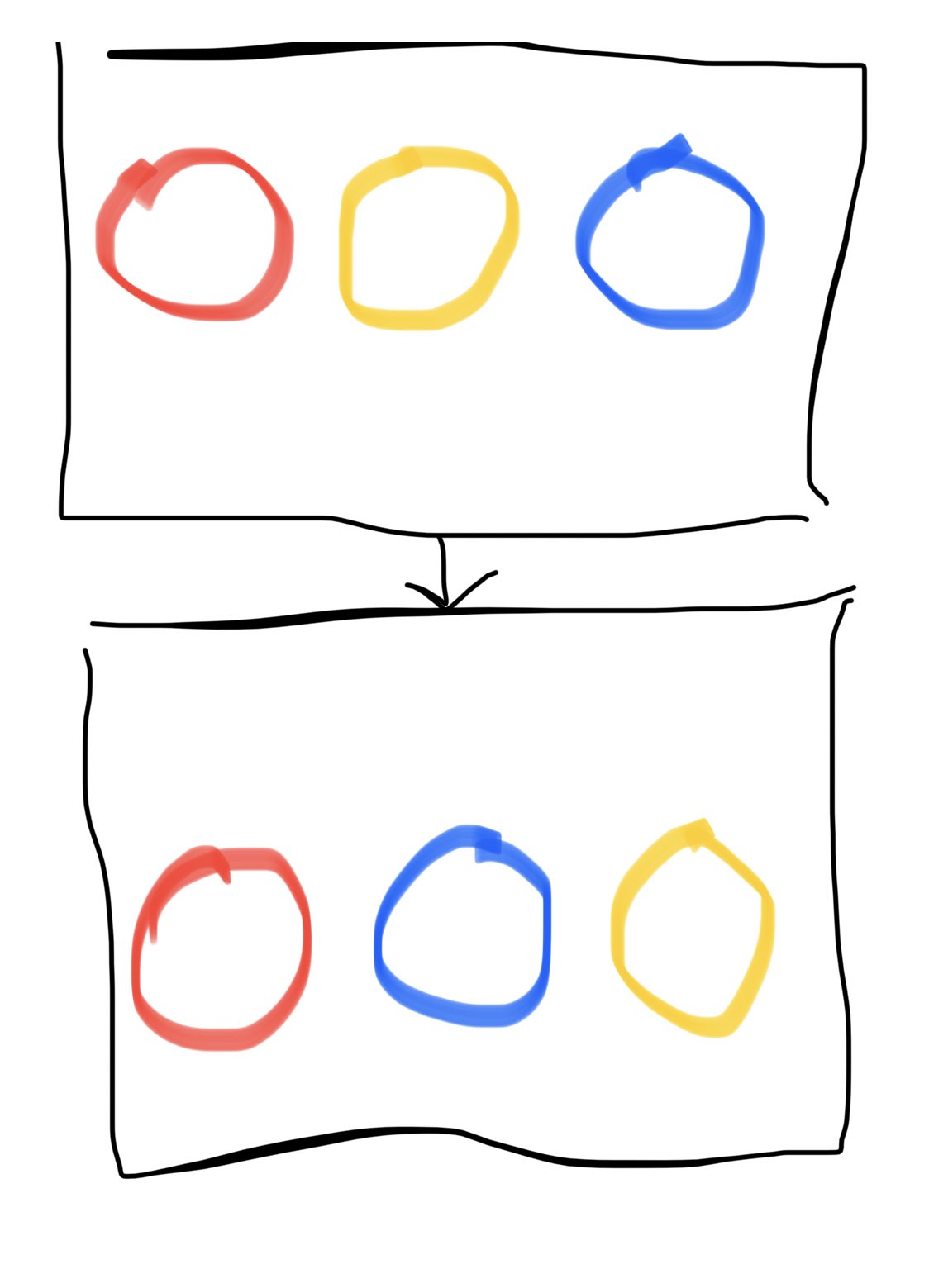
From the linked example, it can be seen that when the three circles of red, yellow, and blue become red, blue, and yellow, there are two possibilities. Possibility one is that the second and third circles have swapped positions, and possibility two is that the second circle has become blue and the third circle has become yellow. Without a unique identifier, we would not know which possibility it is.
Without effective identification, bugs may occur. For example, if the circles have states, such as checkboxes inside them, and the second circle is checked, if the color change is due to the second circle being moved to the third position, in the new rendering, the third circle should be checked. However, if we do not have an identification mechanism, if React mistakenly assumes that the color change is not due to the position change but simply the color change of the second circle, then it will render that the second circle is still checked, which will be a bug.
However, with the key identification mechanism, React knows which component should preserve the original state in the list during a new rendering. Therefore, the reason why React needs keys is that they allow React to differentiate which child components have been added, removed, or modified.
In addition to that, there is an example in the React official documentation (Editor’s note: this is also a recommended example for interviews). In the example, there is a list, and we add a new item to the top:
<li>Connecticut</li>If there were no keys, for React, it would be as if Duke became Connecticut, Villanova became Duke, and a new Villanova was added at the end. In other words, the entire list has changed, so React will discard the old one and rebuild a new list. This is very performance-intensive when the list becomes large.
// Original
<ul>
  <li>Duke</li>
  <li>Villanova</li>
</ul>

// After the change
<ul>
  <li>Connecticut</li>
  <li>Duke</li>
  <li>Villanova</li>
</ul>
However, if we add keys 2015, 2016 to the list items, React will discover that 2015 and 2016 have not changed, so it will leave them untouched. It will only add
<li key="2014">Connecticut</li>to the top. This approach is much more efficient than discarding the entire list and rebuilding it.
// Original
<ul>
  <li key="2015">Duke</li>
  <li key="2016">Villanova</li>
</ul>

// After the change
<ul>
  <li key="2014">Connecticut</li>
  <li key="2015">Duke</li>
  <li key="2016">Villanova</li>
</ul>
In summary, keys allow React to differentiate which child components have been added, removed, or modified. This not only helps to prevent some bugs related to state changes but also makes the rendering process more efficient during updates.
Follow-Up Question: What Principles Should Be Followed When Using Keys?
Keys Must Be Unique
As previously mentioned, keys are a mechanism for React to identify child components in a list, and therefore keys must be unique to avoid potential bugs.
Keys Need To Be Stable and Predictable, or Performance May Degrade
For example,
key={Math.random()};cannot be used. The reason why random values cannot be used is that when React encounters a key, it compares the original nodes based on the algorithm of the rendering mechanism. If it finds that the keys are different, React will destroy the old node and create a new one. If the node hasn’t changed at all and is only destroyed and rebuilt because of the difference in keys, this will cause unnecessary rebuilds and reduce performance (Editor’s note: For more information, refer to this React official document).
Avoid Using Index as Key
In fact, if you don’t specifically set a key, React defaults to using the index of the list as the key. If the list does not have any order changes, such as the three circles above not changing position but only their colors, then there will be no problem. However, using index as the key may cause bugs when the order changes.
For example, if we have a list like the one below and we add an item at index 1, it will cause the original index 1 to become 2. If the item at index 1 had some state, such as Duke being checked, it will now be Boston being checked, while Duke is unchecked. This is the bug we want to avoid!
// Before inserting new item
<ul>
  <li key="0">Connecticut</li>
  <li key="1">Duke</li>
  <li key="2">Villanova</li>
</ul>

// After inserting new item
<ul>
  <li key="0">Connecticut</li>
	<li key="1">Boston</li>
  <li key="2">Duke</li>
  <li key="3">Villanova</li>
</ul>
In summary, the key needs to be unique, stable and predictable, and avoid using the index as the key. These are the three things we need to avoid when using keys.
Why Use Immutable Syntax When Updating React State?
In React, updating state is a common task, but do you know that you should use immutable methods to update state? Why and how should you do it? What is considered an immutable approach? These are frequently asked questions in React interviews, as it is a common problem that developers encounter in their daily work. Let’s explore the answers to these questions in this article.
What Is Immutable?
Immutable means something that cannot be changed, whereas mutable refers to something that can be changed. In programming, an object is mutable if its properties can be modified after it is created. On the other hand, an object is immutable if it is read-only and cannot be changed.
In the context of React, when we want to change a state, we should use an immutable approach. This means that we should not directly modify the state using a mutable approach. For example, if we have a state that represents a coordinate position, we should not modify it like this:
const [pointerPosition, setPointerPosition] = useState({ x: 0, y: 0 });

// In React, we should not do this
pointerPosition.x = 5;
Instead, we should use setState to modify the state in an immutable way. For example:
onPointerMove={e => {
  setPointerPosition({
    x: e.clientX,
    y: e.clientY
  });
}}
Why Do We Need To Use Immutable in React?
The reason why we cannot directly modify an object in React and instead should use setState is because objects are passed by reference. This means that when we modify an object directly, its memory location remains the same. If the object’s memory location does not change, React will not be aware of the change and will not use the new value to re-render the UI. This can lead to unexpected results in the UI.
Follow-Up Question: How Can We Achieve Immutability in React?
In React, we always pass a new value to setState to change the state. This may seem straightforward, as seen in the setPointerPosition example, where we simply pass the new mouse cursor position. However, what if we want to keep some values in the current object? For example, in a login form, we want to keep the username the user has entered when they enter their password. How can we achieve this using an immutable approach?
const [loginInfo, setLoginInfo] = useState({
  account: "",
  password: "",
});
To create a new object while retaining some values from the original object, we can use the spread operator in JavaScript, which is denoted by .... For example, in the login form above, we can do the following:
setLoginInfo({
  ...loginInfo, // Use spread operator to copy values from the original object
  password: e.target.value, // Write the values to be overwritten last
});
However, it is easy to forget to use this syntax in practice. In the community, there are some helper tools that can make it easier to write immutable code. For example, Immer is a popular tool used by React and Redux, which can help us write immutable code more easily (Editor’s note: It is recommended to mention tools like Immer in an interview to demonstrate your knowledge and experience with such tools).
Follow-Up Question: Which JavaScript Array Methods Are Immutable?
In JavaScript, arrays are also objects, and in React, if we have an array as a state, we also need to use an immutable approach when updating it. Which JavaScript array methods are immutable?
Adding Elements to an Array
If we want to add a new element to an array and create a new array at the same time, we can use the spread operator ... or the concat method. While many people would intuitively think of push and unshift to add elements to an array in JavaScript, these two methods directly modify the array, so they should be avoided when updating an array state in React.
To insert an element into an array, we can use the slice method, which allows us to create a new array. We can first slice the array from the start up to the index where we want to insert the new element, then add the new element, and finally slice the remaining part of the array. Because slice returns a new array, it is an immutable operation.
const insertAt = 3; // The index where we want to insert the new element (3 is just an example)
const newArray = [
  ...array.slice(0, insertAt),
  { newItem },
  ...array.slice(insertAt),
];
Removing Elements From an Array
If we want to remove elements from an array and create a new array at the same time, we can use the filter method, which removes elements that do not meet the specified conditions and returns a new array. While pop and shift are often used to remove elements from an array in JavaScript, they directly modify the array, so they should be avoided when updating an array state in React.
Modifying the Value of an Array
If we want to modify the value of an element in an array, we can use the assignment operator
array[index] = "new value";to directly modify the value. However, we cannot do this in React, as it would modify the original array directly and thus violate the immutable principle. Instead, we can use the map method to create a new array and change the value of the element we want to modify.
const modifiedArray = array.map((item, idx) => {
    if (idx === index) {
        // Modify the value of the element
        return ...
    } else {
        // Return the original element
        return item;
    }
});
Using the methods mentioned above can help us maintain immutability when working with arrays in React.